


Translating the MCP standard into a product
Context
In January 2026, MCP Apps launched as the first official MCP extension, allowing tools to return interactive interfaces. Workato had no product model or roadmap capacity for it.
Objective
Understand the protocol deeply enough to turn it into a usable product without disrupting committed roadmap work.
Action
Learned the protocol by building working apps, shifted the strategy from no-code to AI-assisted code, and guided the product through implementation and release.
Outcome
Moved Workato’s MCP tools beyond text responses into interactive experiences. Users could explore and compare data, make structured decisions, and take action directly within an AI conversation.
By late 2025, Workato had already made recipes and skills available as tools inside Claude, ChatGPT, Cursor, and other MCP clients. But most tasks still ended in text, even when users needed to compare records, review rich content, or make several decisions.
I believed interactive interfaces were the next step. The protocol was taking shape, users were moving more work into AI clients, and Workato already had the automation foundation to act quickly.
I advanced the initiative outside the formal roadmap, changed the original no-code direction when the evidence challenged it, and stayed hands-on through design, prototyping, technical decisions, beta, and GA.
Text response
A text response could identify a few accounts, but the rep would have to keep asking questions to discover what other data and dimensions were available.
Interactive app
An MCP App could make the full dataset and its dimensions visible at once, so the rep could immediately see what was possible and explore the results.
Déjà vu: I'd seen this transition before with Slack
MCP Apps were new, but the interaction model they enabled was familiar to me.
Workbot launched in 2016, shortly before I joined Workato. I became closely involved in evolving the experience beyond notifications. In 2017, I designed a richer interaction concept for Workbot and presented it to Stephen Franchetti, Slack's CIO at the time.
The idea was to make Slack more than a destination for notifications. A sales rep could inspect an opportunity and update Salesforce. A manager could review and approve a request. A support team could retrieve a ticket and trigger the next step.
Workato recipes handled the automation while Slack provided the work surface. The principle was simple:
Workbot already had early momentum: more than 1,700 companies were using it within months of its 2016 launch. It could run structured workflows through basic messages and buttons, although building those experiences was tedious.
When Slack launched Block Kit, it gave this pattern a stronger foundation. Workbot gained native forms, date pickers, dynamic menus, multi-step modals, and App Home experiences. Workato made them available through recipes without requiring builders to write Slack JSON. Builders could compose structured messages with fields, images, buttons, and menus. A button could pass business data into another recipe, update Salesforce, and then update the original message to reflect the action.
We also combined messages, images, buttons, and stored context to simulate richer views and pagination. Workbot later became part of daily work across thousands of businesses.
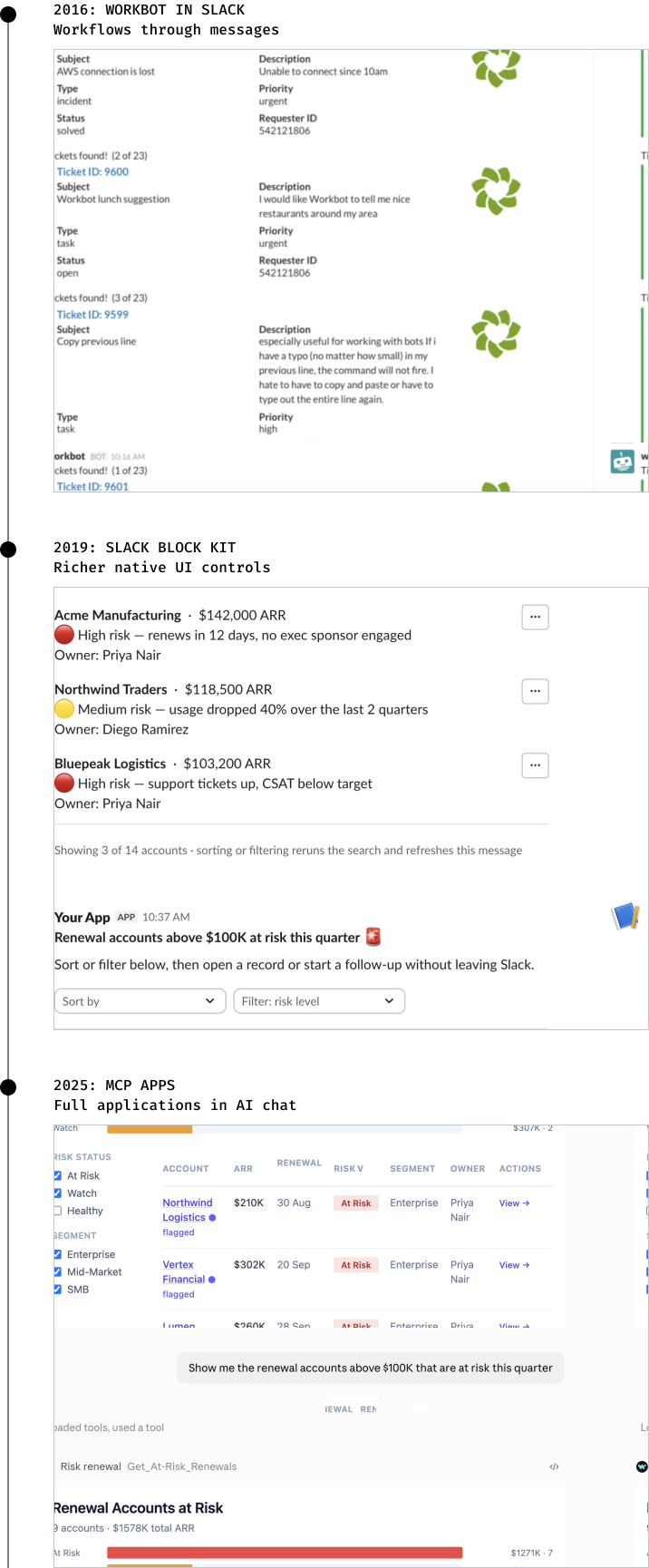
MCP opened a much larger design space
MCP servers made Workato recipes callable from AI clients, but most interactions still ended in text or structured data.
SEP-1865 created an opening to add interactive interfaces. I had already seen with Slack how quickly product experience expectations changed when richer interactions became native to a conversational platform.
However, there was one important difference. Block Kit was a fixed component system tied to Slack. MCP Apps provided a full HTML surface across compatible AI clients. Recreating a fixed component library would have limited builders to what Workato chose to support. A code-first approach could let the interface fit the task.
Workbot had already shown that people wanted to complete work inside a conversational surface. Claude and ChatGPT were becoming new work surfaces, and SEP-1865 offered a shared standard across MCP clients. This was the right time to learn while client behavior, SDK patterns, and authoring conventions were still taking shape.
Translating the protocol into a product
I took the idea to our CPO shortly after the proposal appeared. Engineering built a proof of concept that launched an interface from a Workato tool inside an AI conversation.
The proof worked, but quarterly priorities left no room on the formal roadmap. Waiting a quarter would reduce our time to learn with customers.
Konstantin Zhandov, my engineering partner, proposed and assembled a small team around the existing MCP server work. I joined as the design lead and first builder, working hands-on to understand the protocol and translate its technical model into a product Workato customers could use.
We called ourselves Ship Happens Club. We set out to answer three questions:
- Could the protocol work with Workato MCP servers?
- Could Workato builders create useful apps with it?
- Would those apps offer more value than text?
Changing Workato's no-code direction
My first instinct was to make MCP App authoring drag-and-drop. Workato is a no-code platform, so I pushed to connect the exploration to our existing Pages feature, which supports drag-and-drop interface building. We also explored launching with only predefined views like forms, tables, and dashboards.
Both directions rested on a familiar assumption: visual tools were easier for people without coding experience, while code offered more flexibility. Then engineering built a code-first proof of concept. Building with it suggested that AI had changed the tradeoff. Prompt-assisted code could be as easy to start as drag-and-drop while retaining the flexibility of code.
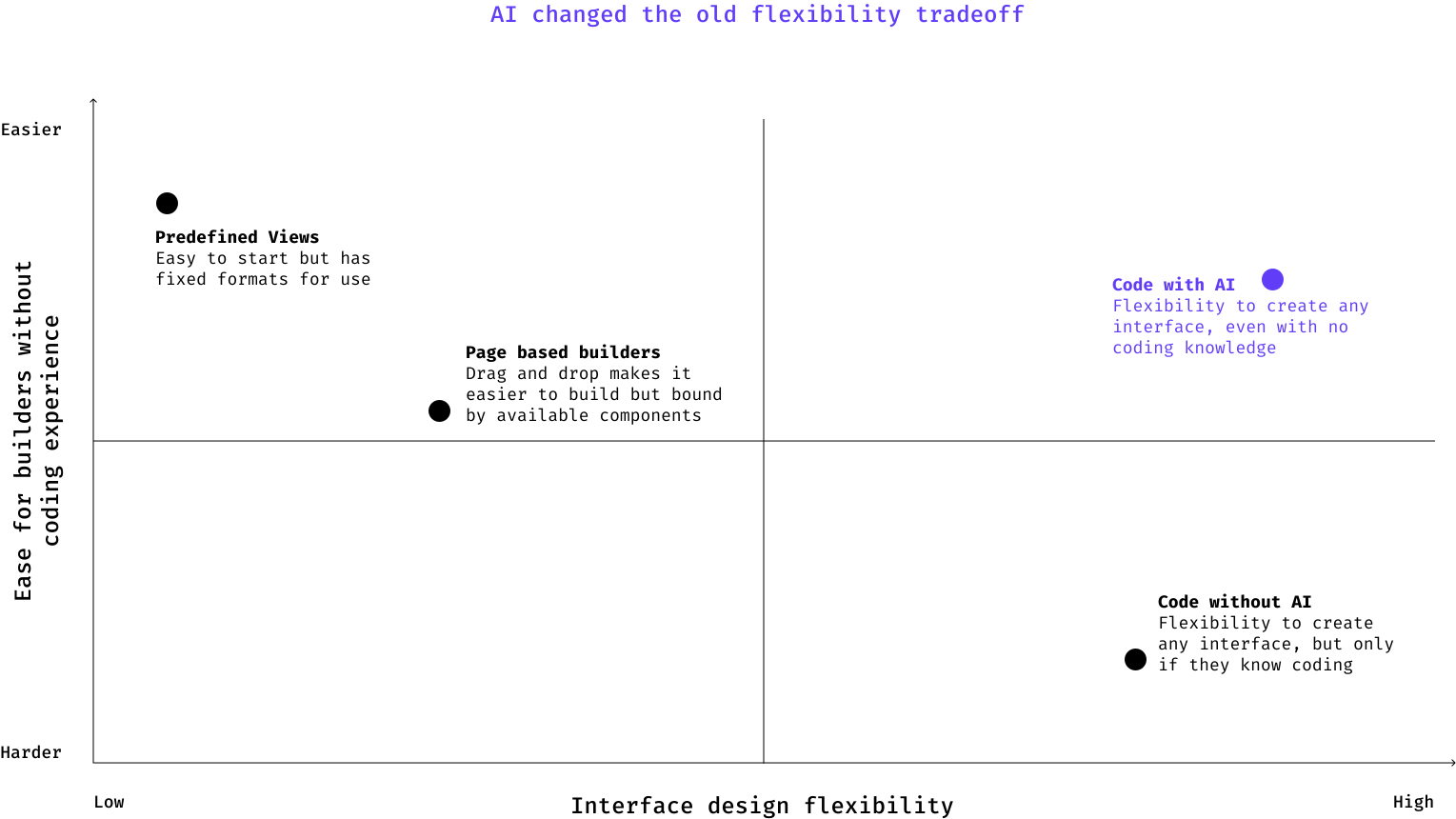
We stopped pursuing Pages and removed a proposed dashboard template from scope. Builders were already using Claude and ChatGPT to generate HTML, CSS, and JavaScript from prompts. AI made that flexibility accessible without requiring Workato to build every component first.
So our job became giving builders and AI the right context, then applying Workato's governance to the generated code.
How MCP Apps work
The model interprets the request and selects the linked tool. That tool launches the app. Once loaded, the app manages the interface and can call other tools on the same MCP server. Workato recipes handle governed operations across business systems.
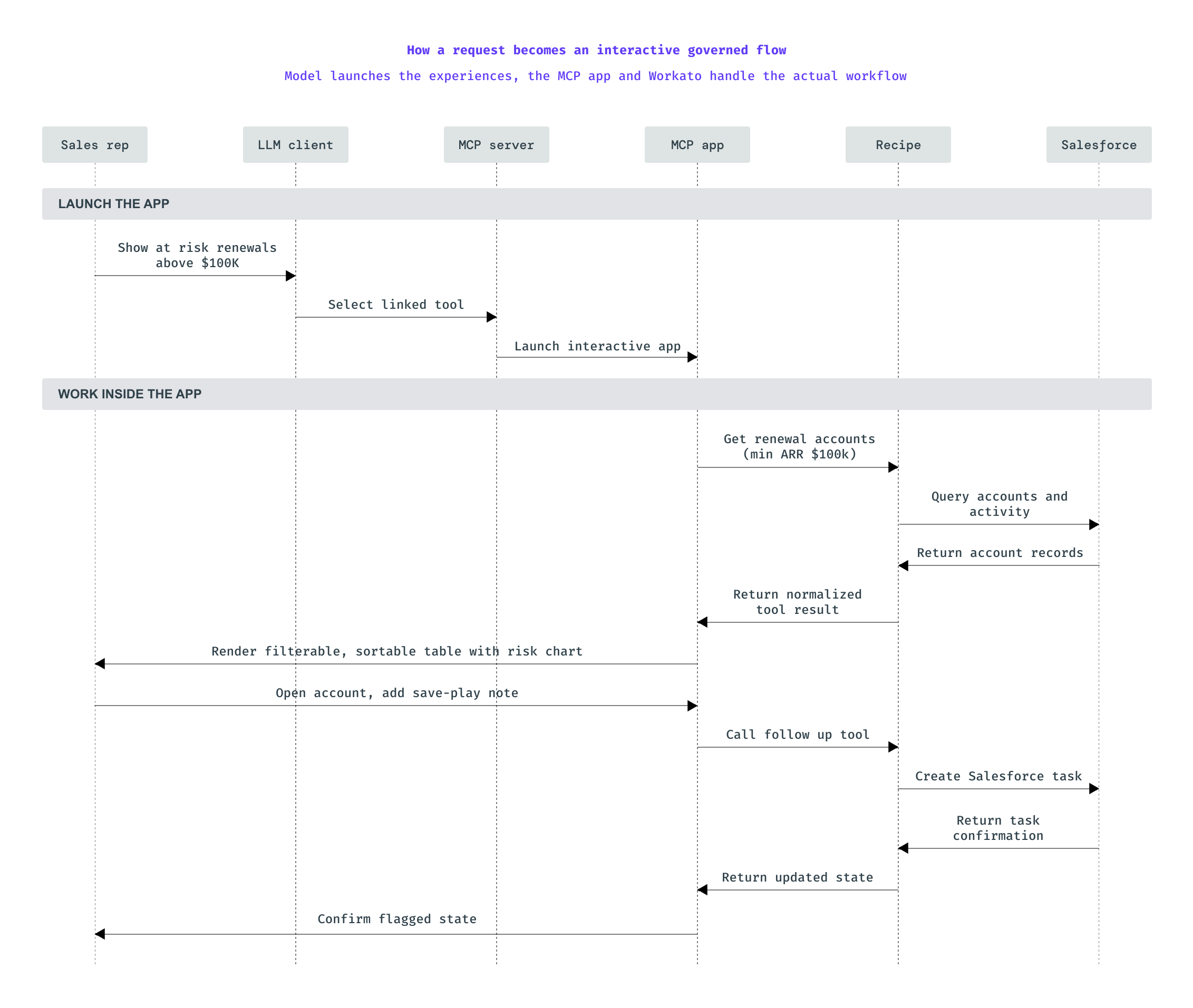
The model launches the experience once. After that, the app works through governed Workato recipes, reducing prompts, tokens, and latency.
The launch tool can return a small acknowledgment while the app retrieves data through another tool. The model doesn't need to process every record for the user to see it, which reduces token use and model latency.
Building the app revealed what the editor needed
Once the code-first proof was ready, I asked Guanyi Fu to design the builder experience. The first screen explorations exposed a more fundamental authoring question: how would data move between tools and the interface?
A builder needed to understand how a recipe's output became interface data, how a user's selection became an input, and how that input reached another tool.
I asked Guanyi to build an MCP App before continuing the screen work. He used an office-booking app as a reference and worked through the full flow.
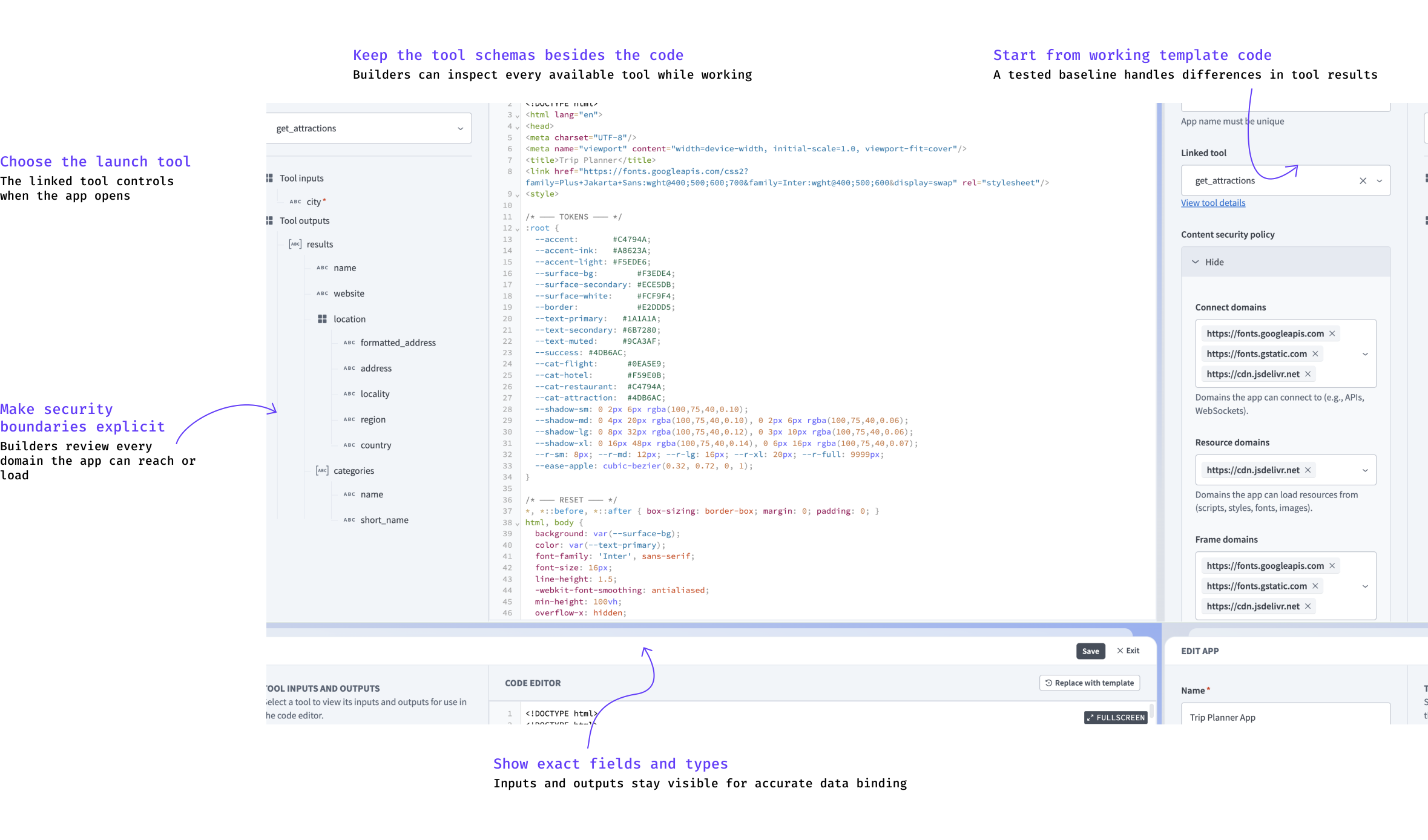
While building, he repeatedly needed to check which tools were available, their exact names, their required inputs, and the data they returned. That friction led us to place tool schemas beside the code editor.
Builders could inspect any tool's inputs and outputs without leaving the page. They could see what one system returned, choose which fields to display, and map a user action to the next tool.
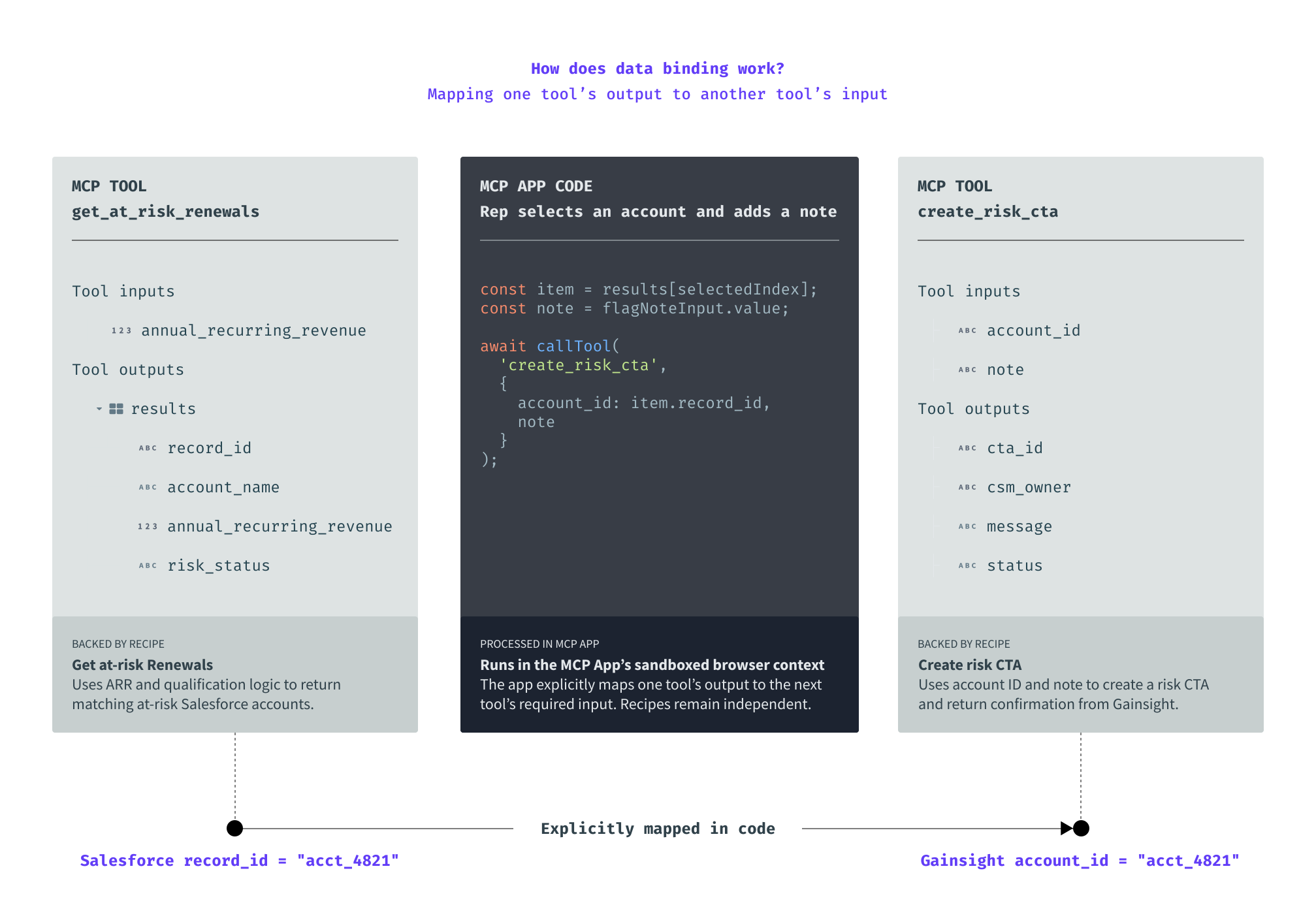
Same account information can be stored in two different business apps with different field names. The MCP app's code is used to map them. Each call routes through the MCP server to its own governed Workato recipe.
Designing support around the technical model
Builders didn't need to understand the full protocol. The product needed to surface the details that determined whether an app worked.
One constraint lived outside the editor: app state is temporary. When information needed to persist across sessions, builders used a Workato tool backed by a data store.
Starter templates provided the right level of help. We made a submission form the default because most Workato tools already accept structured input. It established the SDK connection and showed how to load data and submit values. Its comments were part of the design for builders with limited frontend experience.
Giving AI the same context
The schema panel helped the builder understand the server. AI needed the same context.
I built a rough action that assembled the server description, tool names, descriptions, schemas, existing code, and SDK instructions into a starting prompt. Bochuan Li developed it into the "Code with AI" experience, with options to open the prompt in Claude or ChatGPT.
The panel gives builders a reference while editing, and the prompt gives AI the context to generate valid code.
Decisions beyond the editor
Building real apps exposed issues that static design reviews missed.
Render order
Some tools create or change data, so the AI client asks the user for approval before running them. In our tests, that approval request could appear before the app displayed the form the user needed to review or complete. We added instructions telling the model to wait until the user clicked a button, but clients didn't follow them consistently. This led us to clarify when one tool should open the app and another should perform the action.
Security
AI-generated code could add a new CDN, font, image host, or video in seconds. Automatically allowing each domain would let generated code expand the app's security boundary without consent. Requiring people to explicitly add each domain created errors and friction. To solve this, we chose to auto-detect and add new domains, but warn the builder before saving.
Lifecycle management
Renaming an app linked to a tool could break export and import to a higher environment because the relationship was resolved by name. I chose to let the import complete, even if it meant having unused apps in the target environment. A stray asset could be removed later. A failed deployment was more disruptive.
Validating the approach in the field
We needed to know whether code-first worked outside design and engineering.
I gave Daman, an embedded CSM, access to my preview workspace. He used Claude to generate interface code, AIRO to build deterministic recipes, and MCP to connect them. He produced a travel-planning app and a branded experience modeled on eBay listings.
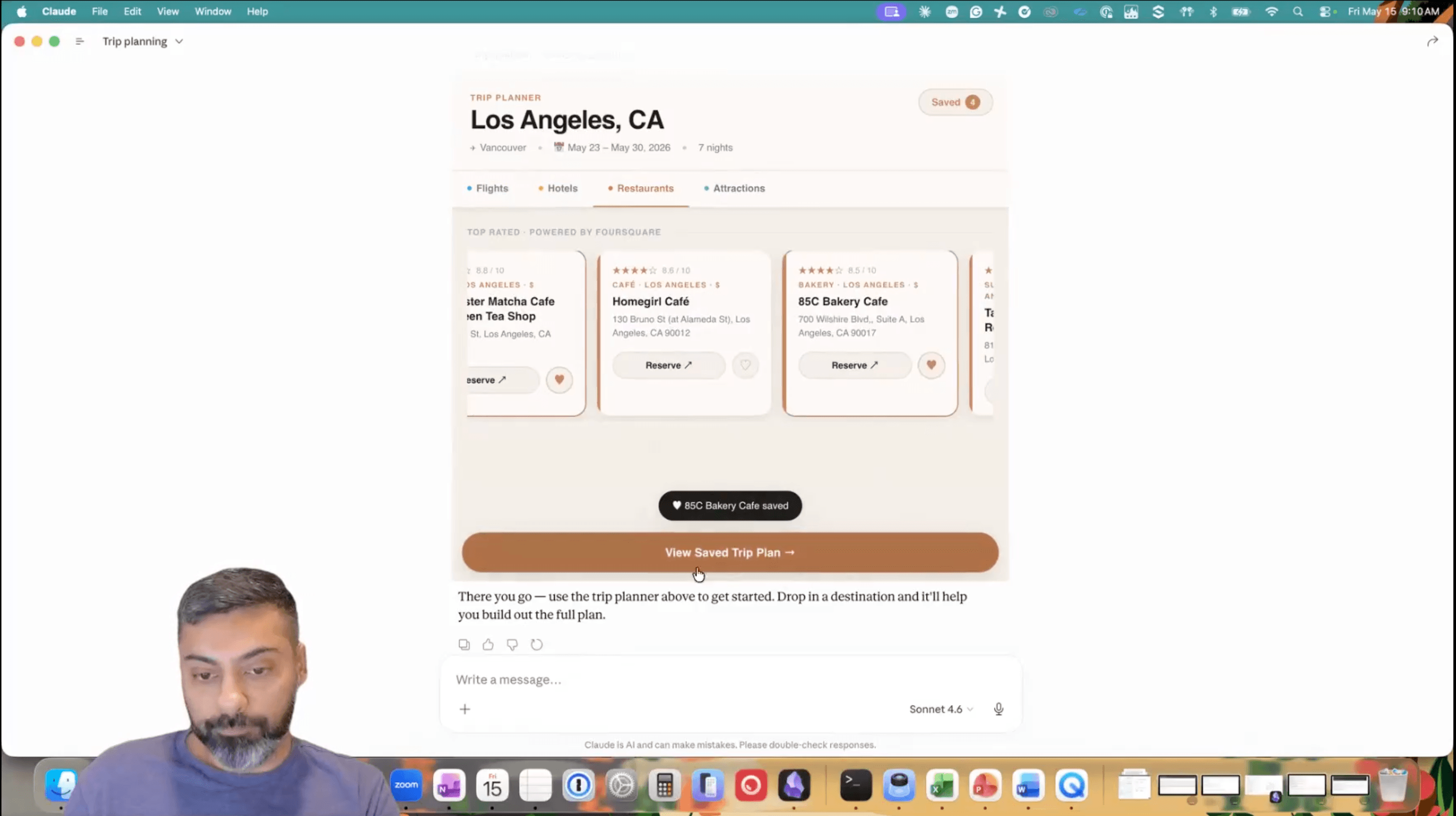
Daman demos the Trip Planner he built with Claude-generated interface code, AIRO recipes, and MCP.
His work showed that someone outside design and engineering could build a useful app, and that field teams could turn a customer scenario into a working experience without waiting for the product team. The eBay-style app became the video in the GA announcement.
My contribution
I connected the emerging specification to an interaction model I had helped establish with Workbot and took the opportunity to our CPO. Once the engineering effort began, I became the design lead and first builder.
I learned the technology by building working apps, then translated its constraints into product decisions. I changed the direction when the proof of concept challenged my no-code assumption, asked designers to build before designing, and coded the first version of "Code with AI." I also worked with engineering on tool binding, render order, security defaults, naming, and lifecycle behavior.
Guanyi led the core design and identified the need to keep tool schemas beside the code. Bochuan turned my prototype into the final "Code with AI" experience. Serene surfaced the sequencing issue that shaped our documentation. Oleg, Denis, Andrey, and Anton built the underlying capability. Daman validated it with field teams.
My role was to understand the technology deeply enough to turn it into a coherent product and guide that product from prototype through implementation and adoption.